
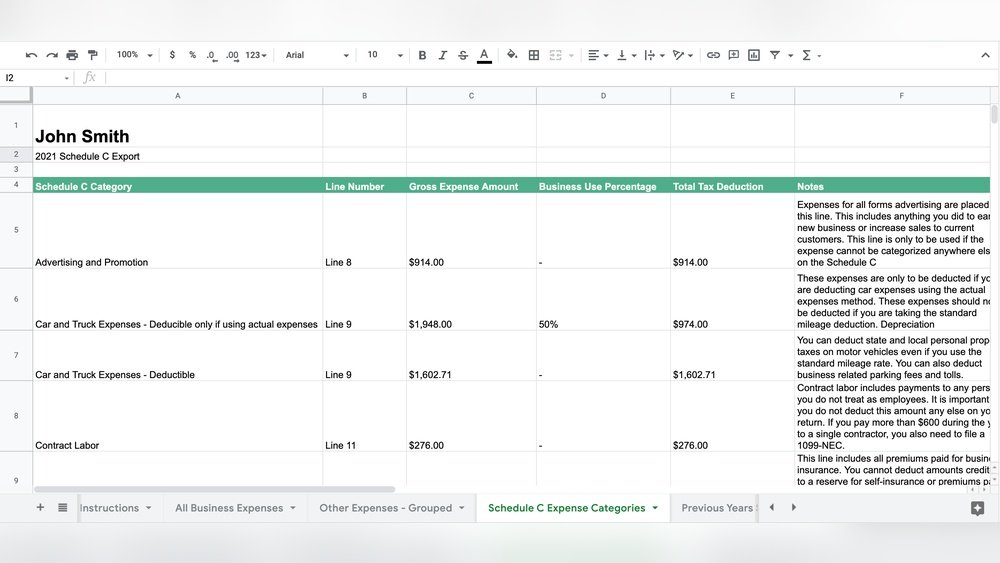
Managing your expenses as a freelancer can quickly become overwhelming, especially when it comes time to file your Schedule C tax form. If you’re like many independent contractors, keeping track of every receipt, mileage log, and business cost feels like a never-ending chore.
But what if there was an easier way? The right expense tracker can simplify your finances, save you hours of frustration, and even help you maximize your tax deductions. You’ll discover the best expense trackers designed specifically for freelancers like you—tools that keep your business organized and make tax season a breeze.
Keep reading to find the perfect match for your freelance hustle and take control of your financial future today.
Top Expense Trackers
Tracking expenses is crucial for freelancers who file Schedule C. The right expense tracker helps organize finances and simplifies tax time. These tools catch every deductible expense. They save time and reduce errors. Here are some top expense trackers designed for freelancers.
Quickbooks Self-employed
QuickBooks Self-Employed focuses on freelancers and independent contractors. It tracks mileage, expenses, and income automatically. The app categorizes expenses to fit Schedule C requirements. Users can estimate quarterly taxes and prepare tax reports easily. It also integrates with TurboTax for smooth filing.
Expensify
Expensify simplifies expense tracking with receipt scanning and automatic categorization. It works well for freelancers who travel or have many small expenses. The app exports reports that fit Schedule C forms. It supports multiple currencies and integrates with accounting software. Expensify saves time on manual entry.
Stride Tax
Stride Tax is built for gig workers and freelancers. It tracks mileage and business expenses with ease. The app also finds tax deductions automatically. Stride helps users estimate tax refunds and payments. It is free to use, making it a good choice for budget-conscious freelancers.
Keeper Tax
Keeper Tax uses AI to find and track deductible expenses. The app works well for freelancers and side hustlers. It helps organize receipts and categorize expenses for Schedule C. Keeper Tax also offers tax filing help and expense reports. It reduces the stress of tax season.
Flyfin
FlyFin is an AI-powered tax engine focused on freelancers. It automatically tracks expenses and categorizes them by tax rules. The app helps prepare Schedule C forms and estimates taxes. FlyFin also offers audit protection and tax advice. It suits freelancers wanting a simple, smart solution.
Key Features To Consider
Choosing the right expense tracker helps freelancers manage finances simply and clearly. Some features matter more for Schedule C filers. These features ease tracking, save time, and reduce tax errors.
Focus on tools that capture expenses accurately and fit your filing needs. The right app should organize your costs and support tax deductions. Here are key features to consider for freelance expense tracking.
Receipt Capture And Categorization
Apps with receipt capture let you snap photos on the go. They store digital copies, reducing paper clutter. Automatic categorization sorts expenses by type. This feature saves time and keeps records neat. Good categorization helps during tax season and audit checks.
Mileage Tracking
Mileage tracking logs your business trips automatically. It records miles driven, dates, and trip purposes. This feature ensures you claim correct car expenses on Schedule C. Some apps use GPS to track routes without manual input. Accurate mileage tracking boosts your tax deductions.
Schedule C Integration
Integration with Schedule C simplifies tax filing. Expense data flows directly into the tax form. This reduces manual entry and errors. Some trackers also offer export options for tax software. Easy integration helps freelancers stay organized and compliant.
Ai-powered Expense Management
AI technology can categorize expenses faster and more accurately. It learns from your spending habits and suggests categories. AI flags unusual expenses for review. This reduces manual work and increases accuracy. It also helps spot potential deductions.
Tax Deduction Identification
Expense trackers that highlight tax deductions save money. They identify eligible business expenses automatically. Some apps explain deduction rules clearly. This helps freelancers maximize returns and avoid mistakes. Knowing deductions upfront guides smarter spending decisions.
Benefits Of Using Expense Trackers
Expense trackers offer many advantages for freelancers filing Schedule C taxes. They help keep financial data clear and organized. Managing expenses becomes easier and less stressful. Using an expense tracker supports better money habits and saves time.
Simplified Tax Filing
Expense trackers gather all costs in one place. This makes tax preparation faster and smoother. They help freelancers avoid missing deductible expenses. Organized records reduce errors on tax forms. Filing Schedule C becomes less confusing and more accurate.
Accurate Expense Records
Trackers record expenses automatically or with minimal effort. This limits mistakes from manual entry. Digital records store dates, amounts, and categories clearly. Accurate expense logs help prove deductions if audited. Freelancers gain confidence in their financial data.
Time Savings
Expense trackers reduce the need for manual bookkeeping. They save hours spent sorting receipts and calculating totals. Many apps sync with bank accounts and credit cards. This automation frees time to focus on work. Time saved means less stress during tax season.
Improved Financial Organization
Using an expense tracker creates a clear overview of spending. Freelancers see where money goes each month. Organized data helps plan budgets and control costs. It supports better decision-making for business growth. Financial clarity brings peace of mind and control.

Credit: www.shoeboxed.com
Free And Affordable Options
Managing expenses without breaking the bank is crucial for freelancers filing Schedule C. Free and affordable tools help track spending, save money, and stay organized. These options suit different needs and budgets. Explore simple spreadsheets, apps with one-time fees, and free trials to find the right fit.
Spreadsheet Templates
Spreadsheet templates offer a free and easy way to track expenses. Many are designed for Schedule C filers and include categories for business costs. Google Sheets and Excel have customizable templates ready to use. They allow simple data entry and automatic calculations. Spreadsheets work well for freelancers who prefer manual control without monthly fees.
One-time Payment Apps
Apps with one-time payments provide more features than spreadsheets. They often include receipt scanning, reports, and tax summaries. Paying once avoids ongoing subscription fees, which saves money long term. These apps suit freelancers who want reliable tools without recurring costs. Look for apps compatible with Schedule C tax forms for best results.
Free Trials And Limited Versions
Many expense trackers offer free trials or limited versions at no cost. These let freelancers test features before buying. Limited versions often include basic tracking and reporting tools. Free trials provide full access for a short period. Use these options to explore popular apps and decide if upgrading makes sense.
Tips For Effective Expense Tracking
Effective expense tracking is essential for freelancers who file Schedule C. It helps maintain clear records for taxes and business insights. Staying organized reduces stress and saves money. The following tips focus on simple habits to track expenses well.
Regular Expense Logging
Log expenses daily or weekly to avoid missing receipts. Small costs add up quickly. Quick entry keeps records accurate and up to date. Use a set time each day to enter expenses. This habit prevents errors and last-minute rushes.
Separating Personal And Business Expenses
Keep personal and business spending separate for clear accounting. Use different bank accounts or credit cards if possible. Mixing expenses makes tax filing harder and less accurate. Track only business-related costs under your Schedule C. This clarity helps during IRS reviews and audits.
Using Mobile Apps For On-the-go Tracking
Use mobile apps to capture expenses anytime, anywhere. Apps allow quick photo capture of receipts and instant entry. This saves time and reduces lost receipts. Many apps categorize expenses automatically for you. Choose apps compatible with Schedule C reporting to ease tax time.

Credit: falconexpenses.com
Common Challenges And Solutions
Tracking expenses as a freelancer can be tricky. Many face issues that slow down their bookkeeping and tax filing. Knowing the common challenges helps find smart solutions. This section covers key problems freelancers face with Schedule C and ways to fix them. Understanding these points saves time and stress.
Handling Multiple Clients
Freelancers often work with many clients at once. Mixing up expenses between clients can cause errors. A good expense tracker lets you assign costs to each client separately. This keeps records clear and ready for tax time. Use tags or categories for each client in your app. It helps track who spent what and when. This way, your reports are always organized and easy to read.
Managing Receipts
Keeping paper receipts is hard and messy. Receipts can get lost or damaged easily. Use an app that scans and stores receipts digitally. This creates a backup and reduces clutter. Digital receipts also link to expenses automatically. This saves time and keeps details accurate. Make it a habit to scan receipts right after a purchase. It prevents missing important tax deductions later.
Dealing With Irregular Income
Freelancers don’t get paid on a fixed schedule. Income changes month to month. This makes budgeting and tax planning tough. Track income and expenses closely using your app. Review reports regularly to see trends and patterns. Set aside money for taxes whenever you get paid. This avoids surprises when tax deadlines arrive. Planning ahead helps keep your finances stable.
Integrations With Other Tools
Integrations with other tools make expense trackers much more useful for freelancers. They help connect your financial data across platforms. This saves time and reduces errors. A good expense tracker should work well with your accounting software, bank accounts, and tax preparation services. This section explores key integrations that benefit freelancers who file Schedule C.
Accounting Software
Expense trackers that integrate with accounting software simplify bookkeeping. They allow automatic syncing of expenses and income. This reduces manual data entry and mistakes. Popular options like QuickBooks and Xero often connect smoothly with expense trackers. This helps freelancers keep accurate records for tax time. Such integration supports faster and easier financial management.
Bank And Credit Card Syncing
Linking bank and credit card accounts to your expense tracker saves effort. Transactions import automatically and update in real-time. This gives a clear view of your spending and income. Syncing helps spot business expenses quickly. It also ensures no transactions are missed. Many expense trackers support multiple banks and card providers for convenience.
Tax Preparation Services
Expense trackers that connect with tax preparation services ease filing. They export data directly to tax software like TurboTax or TaxSlayer. This streamlines Schedule C reporting and deduction claims. Accurate expense tracking with tax prep integration reduces filing errors. It also helps freelancers maximize their tax savings. Integration with tax services can save time and stress during tax season.

Credit: www.keepertax.com
Frequently Asked Questions
What Is The Best Expense Tracker For Freelancers?
The best expense tracker for freelancers is QuickBooks Self-Employed. It offers receipt capture, automatic categorization, and Schedule C tax form export. It simplifies tracking expenses and mileage, making tax filing easier for independent contractors.
How Does Schedule C Affect Expense Tracking?
Schedule C requires detailed expense tracking for tax deductions. Freelancers must categorize expenses correctly to maximize deductions. Using specialized apps helps organize and report these expenses accurately for IRS compliance.
Can Freelancers Use Free Expense Tracking Apps?
Yes, freelancers can use free apps like Stride Tax or Spreadsheetpoint’s Google Sheets tracker. These tools offer mileage tracking and expense management without cost, ideal for those starting or with simple needs.
Why Choose An App With Schedule C Integration?
Apps with Schedule C integration streamline tax filing by exporting data directly. This reduces errors, saves time, and ensures freelancers claim all eligible deductions on their tax return.
Conclusion
Choosing the right expense tracker helps keep finances clear and organized. Tracking expenses regularly saves time during tax season. Good apps simplify Schedule C reporting and reduce errors. Freelancers can focus more on work, less on paperwork. Finding a tool that fits your needs makes a big difference.
Start with a simple app and grow with it. Consistent tracking leads to better financial control and peace of mind.
Related Guides
- Top 5 Real Estate Marketing Tools 2026
- Best Review Management Software (Automated)
- Brightlocal Vs Whitespark
- How to Set Up Automations in Honeybook