
Reader-supported: some links are partner links; we may earn a commission at no extra cost to you, and it never affects our picks. See our disclosure.
Quick answer: Square Appointments is free for individuals (software), then $49/mo (Plus) or $149/mo (Premium) per location for teams. You pay card processing of about 2.6% + 15¢ per in-person tap/dip/swipe (online and card-on-file rates differ). There are no long-term contracts or monthly minimums on the free plan.
Cost breakdown (2026)
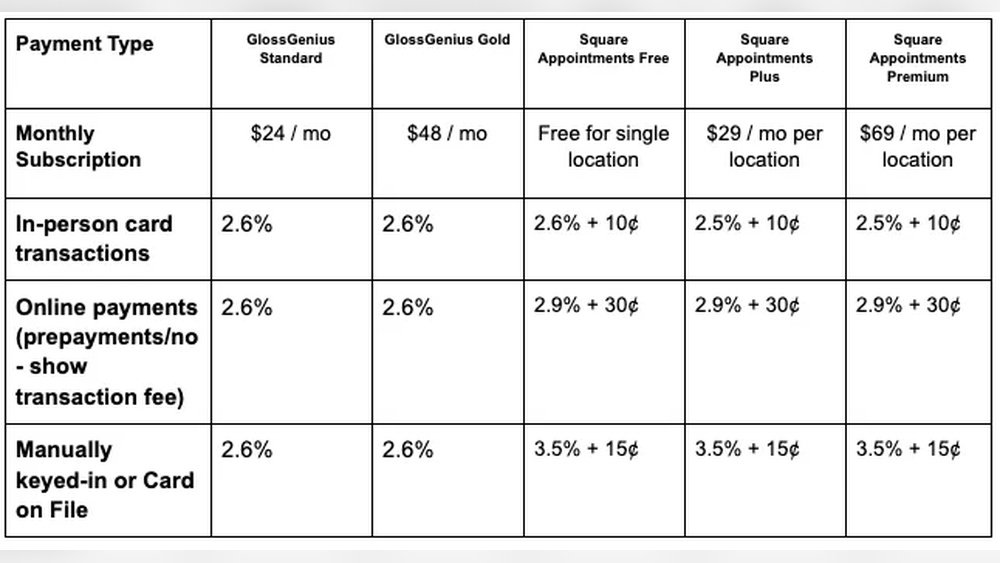
| Plan | Monthly | Best for |
|---|---|---|
| Free | $0 | Solo providers |
| Plus | $49/location | Small teams |
| Premium | $149/location | Larger/multi-location |
In-person processing ~2.6% + 15¢ per card payment. See Square Appointments
Pricing verified against 2026 sources incl. The Salon Business. Confirm current prices on Square’s site.
How we review: total cost, ease of use, features, and real user feedback — see our methodology. Last updated July 2026.
Square Appointments is one of the few booking tools that is genuinely free to start, but “free” only covers the software — you still pay to process cards, and teams pay a monthly fee. Here is exactly what it costs, where the extra charges hide, and how to keep your total down.
The plans
Free ($0) is built for a solo provider: online booking, calendar sync, automated reminders, and payments with standard Square processing — no monthly fee, no contract. Plus ($49/mo per location) adds multi-staff scheduling, more customization, and features like recurring appointments. Premium ($149/mo per location) targets larger or multi-location businesses with the deepest tools. Most solos never need to leave the free tier.
Payment processing fees
This is the cost that actually adds up. In-person card payments run about 2.6% + 15¢ each; online and card-on-file transactions carry higher rates, and ACH/bank options (where available) are cheaper. Processing applies on every plan, including the free one — so at real volume, your processing fees, not your subscription, are usually your biggest Square cost. Estimate them against your monthly card sales, not just the sticker plan price.
Additional charges to watch
A few extras sit outside the plan fee: hardware (a free magstripe reader up to a $299 Terminal or $799 Register), optional add-on services like marketing or payroll billed separately, and no-show/cancellation fees — which are actually a feature you can turn on to protect your income by charging clients who bail. None are hidden, but budget for hardware and only add the services you will use.
How to keep costs down
Stay on the free plan as long as you are solo — it does more than most people realize. Cut no-shows with automatic reminders and required deposits so you are not eating lost slots. Lean on the free built-in tools (booking page, client profiles, basic reporting) instead of paid add-ons, and steer high-value clients toward lower-fee payment methods where practical. Your processing rate is the lever that matters most at volume.
Frequently asked questions
Does Square Appointments charge a fee?
The software is free for a solo provider; teams pay $49/mo (Plus) or $149/mo (Premium) per location. On every plan you also pay card processing of about 2.6% + 15¢ per in-person payment, so a solo can run it for just the processing fees.
Is Square Appointments really free?
Yes — for a single provider the software is genuinely free with no monthly fee or contract. You only pay per-transaction card processing. Multi-staff and multi-location businesses need the paid Plus or Premium tiers.
How much does Square take per transaction?
About 2.6% + 15¢ for an in-person card payment; online and card-on-file rates are higher. Square does not charge a flat 3% — and processing applies on the free plan too, so factor it into your real monthly cost.
Are there no-show fees?
You can enable no-show and late-cancellation fees yourself — it is a feature to protect your income, not a charge Square imposes on you. Pairing it with required deposits is the most effective way to reduce lost appointments.
The bottom line
Square Appointments is one of the most cost-effective booking tools out there: free for solos, transparent $49/$149 tiers for teams, and clear ~2.6% + 15¢ processing. Watch the processing fees at volume and budget for hardware, but there are no contracts or hidden minimums. For how it stacks up against a paid competitor, see our Square Appointments vs Vagaro comparison.