
Reader-supported: some links are partner links; we may earn a commission at no extra cost to you, and it never affects our picks. See our disclosure.
Quick answer: Square Appointments is free for individuals (software), then $49/mo (Plus) or $149/mo (Premium) per location for teams. You pay card processing of about 2.6% + 15¢ per in-person tap/dip/swipe (online and card-on-file rates differ). There are no long-term contracts or monthly minimums on the free plan.
Cost breakdown (2026)
| Plan | Monthly | Best for |
|---|---|---|
| Free | $0 | Solo providers |
| Plus | $49/location | Small teams |
| Premium | $149/location | Larger/multi-location |
Plus processing ~2.6% + 15¢ per in-person card payment. See Square Appointments
Pricing verified against 2026 sources incl. The Salon Business. Confirm current prices on each vendor’s site.
How we review: total cost, ease of use, features and real user feedback — see our methodology. Last updated June 2026.
If you’re considering Square Appointments for your business, one question probably tops your mind: how much will it actually cost you? Understanding the fees behind Square Appointments is crucial before you commit.
You want to know exactly what you’re paying for, avoid surprises, and make sure the service fits your budget. We’ll break down Square Appointments fees clearly and simply. By the end, you’ll have a full picture of the costs involved—so you can decide if this tool is the right fit for your business without any guesswork.
Keep reading to get all the details you need to make an informed choice.
Square Appointments Plans
Square Appointments offers different plans tailored to suit various business needs. Each plan includes features designed to help manage bookings and payments efficiently. Understanding these plans helps you choose the best option for your business size and budget.
Free Plan Features
The Free Plan is ideal for solo professionals. It allows one user to manage appointments without any monthly fee. Features include online booking, calendar sync, and automated reminders. You also get payment processing with standard Square fees. This plan covers the basics for small businesses.
Plus Plan Benefits
The Plus Plan supports multiple staff members and locations. It adds advanced scheduling tools and priority customer support. You can manage recurring appointments and send customized notifications. This plan is perfect for growing businesses needing more control. A monthly fee applies, but it offers extra value.
Comparing Plan Costs
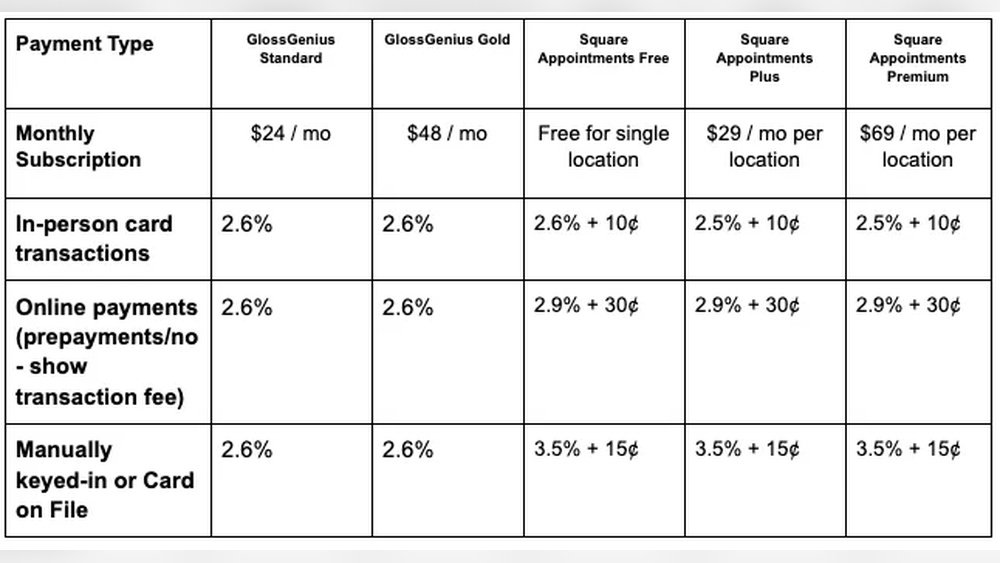
Costs depend on the number of users and features needed. The Free Plan has no monthly charge but includes payment processing fees. The Plus Plan charges a monthly fee per location, plus payment fees. Businesses should weigh features against costs to find the best fit. Square’s transparent pricing makes comparison simple.

Credit: squareup.com
Payment Processing Fees
Payment processing fees are a key part of using Square Appointments. These fees cover the cost of handling payments made by your customers. Understanding these fees helps you manage your business expenses better. Square charges different rates based on payment methods and subscription plans. This section explains how these fees work and what to expect.
Card Payment Rates
Square charges a fixed percentage and a small fee for card payments. This applies to credit and debit cards used in person or online. The standard rate is usually around 2.6% plus 10 cents per transaction. This fee covers the cost of securely processing payments. It applies whether customers pay with Visa, Mastercard, or other major cards.
Ach And Other Payment Types
ACH payments, which are bank transfers, have lower fees than card payments. Square typically charges about 1% per ACH transaction. Other payment types, like digital wallets, may have different rates. These fees are generally lower because they involve less risk and processing work. Knowing these rates helps you choose payment options for your clients.
Fee Variations By Plan
Square Appointments offers several subscription plans. Each plan has its own fee structure for processing payments. Higher-tier plans may offer lower rates or additional features. Basic plans usually have standard fees without discounts. Choosing the right plan can reduce your payment processing costs. Review each plan carefully to find the best fit for your business.
Additional Charges
Square Appointments offers a clear pricing structure but some extra costs might apply. These additional charges depend on your business needs and how you use the platform. Understanding these fees helps you avoid surprises and plan your budget well.
No-show And Cancellation Fees
Square allows you to set fees for no-shows and late cancellations. These fees help protect your income from lost appointments. You can customize the amount and when the fee applies. This encourages clients to respect your schedule and reduces wasted time.
Hardware And Software Costs
Using Square Appointments may require extra hardware like card readers or registers. These devices come with one-time or monthly costs. Some advanced software features might also have fees. These costs vary depending on your business size and needs.
Add-on Service Fees
Square offers extra services beyond basic appointments. Features like marketing tools or payroll add-ons may have separate charges. These add-ons improve your business operations but increase your monthly expenses. Choose only the services that fit your goals and budget.

Credit: squareup.com
Cost-saving Tips
Saving money on Square Appointments fees can help your business keep more profit. Small changes in how you use the app and manage payments add up over time. These cost-saving tips focus on lowering fees without cutting important features. Use these ideas to run your appointments smarter and cheaper.
Reducing Processing Fees
Processing fees take a chunk from each payment. Choose payment methods with lower fees to save money. Encourage clients to pay by debit or ACH transfer when possible. Batch payments or use invoicing options to reduce transaction counts. Check if your plan offers lower fees for high volume transactions. Review your fees regularly and adjust payment options to fit your needs.
Optimizing Appointment Scheduling
Use scheduling tools to avoid no-shows and cancellations. Send reminders automatically to clients before appointments. Block off times that are less busy to maximize staff use. Combine short appointments when possible to reduce transaction fees. Track your busiest hours and focus booking there. This reduces wasted time and lowers costs linked to unused slots.
Leveraging Free Features
Square Appointments offers free tools that many do not use fully. Use the built-in calendar and reminder system to avoid extra costs. Set up client profiles to speed up checkouts and reduce errors. Use the free website booking page to save on website fees. Explore free reporting features to understand your business better. Using these tools well can cut costs without extra spending.
Calculating Total Expenses
Calculating total expenses is essential for managing your Square Appointments budget. Understanding all costs helps avoid surprises and keeps your business on track. Fees include subscription charges, payment processing, and optional services. Estimating these expenses accurately ensures you know your monthly and yearly spending.
Using Fee Calculators
Fee calculators provide a clear view of your Square Appointments costs. Enter your expected number of appointments and payment amounts. The calculator estimates monthly fees, including processing charges. This tool helps you plan your budget and compare pricing plans easily.
Estimating Monthly Costs
Calculate your monthly expenses by adding subscription fees and transaction fees. Subscription fees vary by plan, starting from a free option to paid tiers. Transaction fees depend on payment methods and volume. Include any additional costs like no-show fees or extra services for accuracy.
Planning For Growth
Plan expenses ahead as your business grows. Higher appointment volumes increase transaction fees. Consider upgrading your Square plan to access more features. Budget extra for marketing or new tools. This foresight helps manage cash flow and supports expansion smoothly.

Credit: glossgenius.com
Frequently Asked Questions
Does Square Appointments Charge A Fee?
Square Appointments charges a monthly fee based on your plan. Payment processing fees apply per transaction.
Is A 3% Transaction Fee A Lot?
A 3% transaction fee is standard for many payment processors. It covers processing and service costs efficiently. For small businesses, it’s reasonable but can add up with high sales volume. Comparing fees helps find the best fit for your business needs and budget.
Does Square Charge A 3% Fee?
Square does not charge a flat 3% fee. Fees vary by payment type and plan, typically around 2. 6% + 10¢ per transaction.
Who Pays The 3% Credit Card Fee?
The 3% credit card fee is usually paid by the merchant processing the payment. Customers typically do not pay this fee directly.
Conclusion
Understanding Square Appointments fees helps you manage costs better. Fees depend on your chosen plan and payment methods. Transparent pricing makes it easier to predict your expenses. Knowing these details lets you focus on growing your business. Keep an eye on updates to avoid surprises later.
Clear knowledge of fees leads to smarter financial decisions. Square Appointments offers options suitable for many business types. Choose the plan that fits your needs and budget well. Simple fees and clear terms support smooth appointment management.