
Reader-supported: some links are partner links; we may earn a commission at no extra cost to you, and it never affects our picks. See our disclosure.
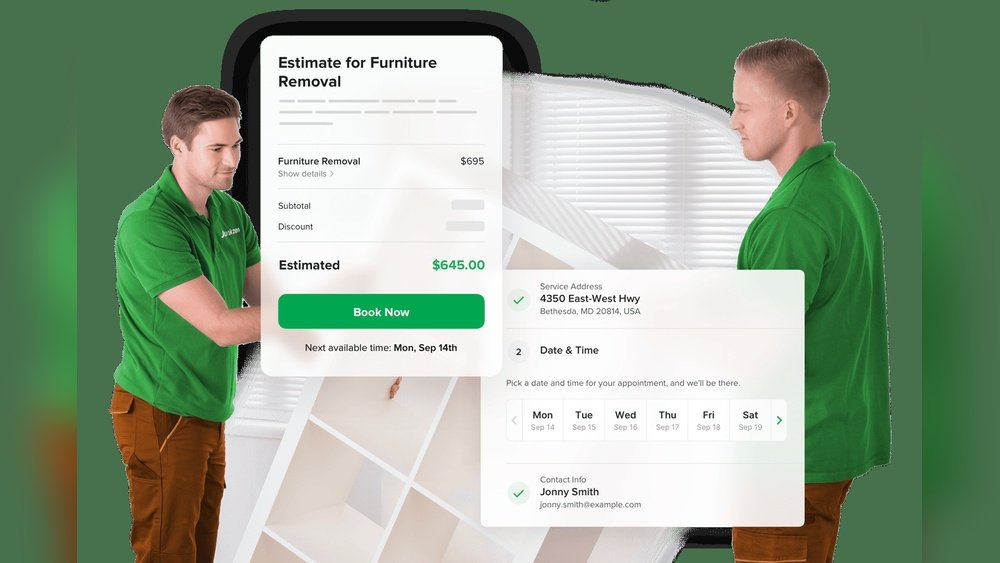
Quick verdict: For junk-removal businesses, Jobber is the best all-rounder for scheduling, on-site quoting and invoicing from $49/mo. Pick Housecall Pro ($69/mo) for marketing and online booking, or Workiz when dispatching multiple trucks.
Compared at a glance (2026)
| Software | Best for | Starts at | Billing |
|---|---|---|---|
| Jobber | Scheduling + on-site quotes | $49/mo | Month-to-month available |
| Housecall Pro | Online booking + marketing | $69/mo | Month-to-month available |
| Workiz | Multi-truck dispatch | ~$225/mo (5 users) | Monthly available |
Pricing verified against independent 2026 comparisons from Fieldproxy and LeadDuo. Confirm current prices on each vendor’s site.
Visit Jobber Visit Housecall Pro
How we choose: mobile usability in the field, total cost (add-ons + contract terms), core job-to-cash features, support, and real owner feedback — see our review methodology. Last updated June 2026.
Running a junk removal business means juggling many tasks at once—finding customers, managing crews, and most importantly, scheduling jobs efficiently. If you’ve ever felt overwhelmed trying to keep your appointments organized or worried about double bookings, you’re not alone.
The right scheduling software can transform the way you manage your business, saving you time, reducing stress, and boosting your bottom line. You’ll discover the best junk removal business software designed to make your scheduling smooth, simple, and stress-free. Keep reading to find the perfect tool that fits your needs and helps your business run like clockwork.
Credit: www.method.me
Top Scheduling Software
Efficient scheduling software is vital for junk removal businesses. It simplifies appointment bookings and staff management. The right tool saves time and reduces errors. Here are some top scheduling software options that suit various business needs.
Calendly Features
Calendly offers simple, automatic scheduling. It connects well with tools like HubSpot and Zapier. The interface is easy to use for both teams and clients. It supports group scheduling and buffers between appointments. Calendly scales smoothly as your business grows.
Youcanbook.me Benefits
YouCanBook.me stands out for customization options. It adjusts easily to different time zones. This makes it perfect for businesses with international clients. The free plan is strong and covers basic needs. It also integrates with Google and Microsoft calendars.
Setmore Overview
Setmore is a budget-friendly choice for small teams. It offers custom booking pages to match your brand. The software handles multiple staff calendars in one place. Basic features are free, but advanced tools require payment. Setmore supports online payments and reminders.
Jobber For Field Service
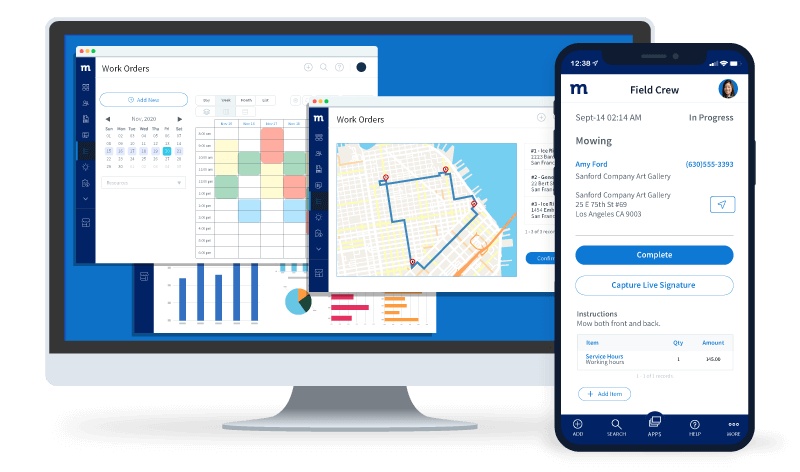
Jobber targets service businesses with field workers. It helps manage jobs, clients, and invoices. The app allows easy scheduling of teams in the field. Jobber improves communication between office and staff. It also tracks work progress and billing efficiently.
Sling For Employee Scheduling
Sling focuses on employee scheduling and labor costs. It provides a clear view of shifts and availability. The tool sends notifications to reduce no-shows. Sling’s interface is user-friendly and easy to learn. A free version covers basic scheduling needs well.
Additional Software Options
Besides popular scheduling tools, some additional software options offer unique features for junk removal businesses. These tools help manage appointments, reminders, and team coordination with ease. Each option suits different business needs and team sizes. Explore these choices to find the right fit for your scheduling tasks.
Acuity Scheduling Highlights
Acuity Scheduling stands out with automatic email and text reminders. It reduces no-shows by keeping clients informed. Clients can book, reschedule, or cancel appointments online. The platform supports multiple time zones, ideal for serving broader areas. Integration with calendars like Google and Outlook is seamless.
Square Appointments Strengths
Square Appointments excels in mobile booking capabilities. It works well on smartphones and tablets for on-the-go scheduling. The system combines appointment setting with payment processing. This feature simplifies customer transactions during booking. It is especially useful for small teams and solo operators.
Zoho Bookings Integration
Zoho Bookings integrates perfectly with other Zoho business apps. It offers easy syncing with Zoho CRM and Zoho Calendar. This helps streamline client data and scheduling. Automated reminders and follow-ups improve customer communication. The interface is user-friendly for both staff and clients.
Connecteam For Remote Teams
Connecteam supports remote teams with scheduling and task management. It allows assigning jobs and tracking progress in real-time. The app includes communication tools to keep teams connected. It fits well with junk removal companies that have field workers. Reporting features help monitor team performance efficiently.
Choosing The Right Software
Choosing the right junk removal business software for scheduling affects your daily operations. The best tool fits your business style and helps you save time. It must handle appointments, manage crews, and keep customers happy. This section guides you through picking software that works well for your needs.
Identify Core Needs
Start by listing tasks you must manage daily. Think about booking jobs, assigning crews, and tracking schedules. Check if the software supports mobile use for teams in the field. Also, consider if you need customer reminders or payment options. Knowing your core needs narrows down choices fast.
Free Vs. Paid Plans
Free plans suit small or new businesses with simple needs. They often limit users, features, or support. Paid plans offer more tools like advanced scheduling and reporting. They also include better customer service. Decide what features you need now and later before picking a plan.
Industry-specific Solutions
Some software targets junk removal and field services. These tools include routing, job tracking, and customer messaging. Industry-specific solutions reduce manual work and errors. They fit your workflow better than generic schedulers. Look for features built for junk removal businesses for best results.
Key Features To Consider
Choosing the right junk removal business software for scheduling improves your daily operations. Focus on key features that simplify tasks and boost efficiency. These features help manage appointments, staff, and payments smoothly. Understanding them guides you to pick software that fits your business needs perfectly.
Automation And Integrations
Automation saves time by handling repetitive tasks like booking and follow-ups. Look for software that integrates with tools such as CRM, email, and calendars. This connection reduces manual work and keeps data consistent. Automated reminders and notifications keep clients and staff informed without extra effort.
Customization And Time Zone Support
Customizable booking options let you tailor the software to your business style. Adjust forms, schedules, and notifications to match your process. Time zone support is crucial if you serve clients in different areas. It prevents confusion by showing correct times for appointments everywhere.
Employee And Field Staff Management
Managing your team is easier with features that track schedules and availability. Good software allows assigning jobs to field staff and monitoring their progress. It helps avoid double bookings and ensures the right person handles each task. Mobile access lets employees update their status on the go.
Payment And Reminder Options
Integrated payment systems speed up billing and improve cash flow. Choose software that supports multiple payment methods like credit cards and online wallets. Automated reminders reduce missed payments and no-shows. These tools make the customer experience smooth and professional.
User Experience And Support
User experience and support play a key role in choosing the best junk removal business software for scheduling. A smooth scheduling process saves time and reduces errors. Reliable support helps solve issues quickly. Both ensure daily operations run without hassle.
Ease Of Scheduling
Good software offers simple, clear steps to book jobs. Users can select dates, times, and services without confusion. Mobile-friendly designs allow scheduling on the go. Automated reminders reduce missed appointments. These features keep the workflow steady and clients happy.
Communication Tools
Built-in messaging helps teams and customers stay connected. Real-time updates notify clients about job status changes. Some software includes calls and texts to confirm details fast. Clear communication prevents misunderstandings and boosts trust. It also helps coordinate field staff efficiently.
Customer Support Quality
Responsive customer support solves problems with minimal downtime. Support teams available via chat, phone, or email add convenience. Helpful guides and tutorials assist users in learning features quickly. Quality support builds confidence in the software choice. It ensures businesses keep running smoothly without delays.

Credit: financialmodelslab.com
Pricing And Scalability
Pricing and scalability play key roles in choosing the right junk removal business software. Affordable plans make it easier for small businesses to start. At the same time, scalable options support growth without constant software changes. This balance helps companies manage costs while expanding their teams and services.
Budget-friendly Plans
Many junk removal software providers offer budget-friendly plans. These plans often include basic scheduling features perfect for small teams. Low monthly fees and no long-term contracts keep costs manageable. Some even provide free trials to test the software before buying. This approach helps new businesses avoid large upfront expenses.
Scalability For Growing Teams
Scalable software adjusts to your team size and workload. Adding users or locations usually costs less than switching platforms. Features like automated scheduling and route optimization grow with your business. Cloud-based systems offer easy upgrades without downtime. This flexibility ensures your software supports growth smoothly and efficiently.
Value For Cost
Value means getting useful features without overspending. The best software combines scheduling, customer management, and billing tools. This integration saves time and reduces errors. Many providers offer tiered pricing so you pay only for what you need. Good value software helps increase productivity and customer satisfaction.
Real-world Business Use Cases
Scheduling software plays a key role in running a junk removal business smoothly. Real-world examples show how these tools improve daily operations. They help manage appointments, reduce no-shows, and keep teams on track. Many small and medium businesses use scheduling software to save time and serve customers better.
Junk Removal Services
Junk removal companies handle many appointments each day. Scheduling software helps organize pickups and drop-offs efficiently. It sends reminders to customers and drivers. This reduces missed appointments and delays. Businesses track job status in real time. It also helps assign the closest team to a job, saving travel time and fuel.
Cleaning And Plumbing
Cleaning and plumbing businesses use scheduling software to manage field staff. They book appointments based on technician availability and skills. The software sends alerts for upcoming jobs. It also stores customer information for quick access. This reduces phone calls and manual scheduling errors. Customers can book or change appointments online at any time.
Consulting And Remote Work
Consultants and remote workers rely on scheduling tools for client meetings. These tools sync with calendars and allow easy rescheduling. They send automatic reminders to reduce no-shows. Scheduling software supports video calls and integrates with other apps. This makes managing multiple clients easier and more organized. It also helps keep track of billable hours and meeting notes.

Credit: www.clutterquote.com
Frequently Asked Questions
What Is The Best Scheduling Software For Small Businesses?
The best scheduling software for small businesses includes Calendly for integrations, YouCanBook. me for customization, Setmore for affordability, Jobber for field services, and Sling for employee scheduling. Choose based on your specific needs like automation, budget, or industry features.
What Is The Best Project Scheduling Software?
The best project scheduling software depends on your needs. Top choices include Calendly for automation, YouCanBook. me for customization, Setmore for budgets, Jobber for field services, and Sling for employee scheduling and labor cost control.
What Is The Most Commonly Used Scheduling System?
The most commonly used scheduling system is Calendly. It offers easy automation, integrations, and a user-friendly interface suitable for businesses of all sizes.
What Is The Best Online Appointment Scheduling Software?
The best online appointment scheduling software varies by needs. Calendly, YouCanBook. me, and Setmore suit general use. Jobber fits service businesses with field staff. Sling excels in employee scheduling and labor cost control. Choose based on features, industry, and budget.
Conclusion
Choosing the right scheduling software makes junk removal easier and more efficient. Simple tools save time and reduce errors in booking. Many options fit different business sizes and budgets. Focus on features you truly need for daily operations. Good scheduling software improves customer communication and team coordination.
Try free versions to find what suits your business best. Smart scheduling helps your junk removal service run smoothly every day.
Related Guides
- Moving Bill of Lading Template (PDF): Easy, Free & Printable Guide
- HVAC Maintenance Checklist for Technicians
- How to Price Junk Removal Jobs (Volume Vs Weight)
- Best CRM for Garage Door Repair Businesses