
Reader-supported: some links are partner links; we may earn a commission at no extra cost to you, and it never affects our verdict. See our disclosure.
Quick verdict: For a free option, Tawk.to is unbeatable — unlimited agents and chats at $0 (it’s the most-installed WordPress chat plugin). For the best all-around tool, Tidio (from $29/mo) bundles live chat, chatbots and AI. Larger support teams should look at LiveChat (from $20/agent/mo).
Compared at a glance (2026)
| Software | Best for | Starts at |
|---|---|---|
| Tawk.to | Best free (unlimited agents) | $0 ($29/mo to remove branding) |
| Tidio | All-in-one chat + chatbot + AI | $29/mo |
| LiveChat | Larger support teams | $20/agent/mo |
Pricing verified against 2026 sources incl. Tidio and Alliance Interactive. Confirm current prices on each vendor’s site.
How we review: total real cost (subscription + apps/hosting + fees), ease of use, scalability, and real user feedback — see our methodology. Last updated June 2026.
Looking to boost your WordPress website’s customer engagement and sales? Choosing the right live chat software can make all the difference.
Imagine being able to connect with your visitors instantly, answer their questions, and guide them toward making a purchase—all in real time. But with so many options out there, how do you find the best live chat software that fits your needs and budget?
You’ll discover the top live chat plugins for WordPress that are easy to use, powerful, and proven to increase conversions. Keep reading to find the perfect tool that will transform your website into a customer-friendly powerhouse.
Top Live Chat Plugins
Choosing the right live chat plugin can greatly improve customer support on your WordPress site. The best live chat plugins offer easy installation, real-time messaging, and useful tools for managing conversations. These plugins help businesses connect quickly with visitors and boost engagement.
Here are some top live chat plugins for WordPress, each with unique features and benefits. They cater to different business needs and budgets.
Livechat Features
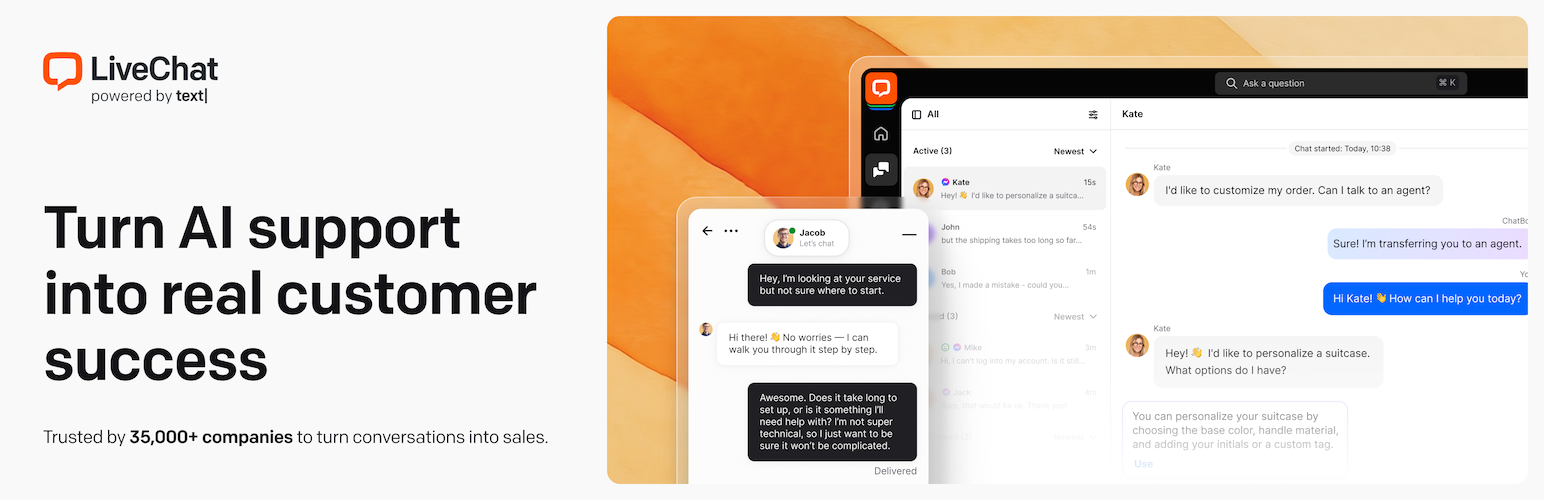
LiveChat provides a clean and user-friendly chat interface. It supports automated greetings and quick responses. The plugin integrates with many CRM and email marketing tools. It offers detailed reports to track customer satisfaction. LiveChat works well for online stores and service websites.
Tawk.to Benefits
Tawk.to is a free live chat solution with many customization options. It allows unlimited agents and chat history. The plugin supports real-time visitor monitoring and automated triggers. It also includes a mobile app to chat on the go. Tawk.to suits small businesses and startups with limited budgets.
Olark Capabilities
Olark focuses on improving customer interaction and sales conversions. It offers chat transcripts and visitor insights. The plugin supports targeted chat based on visitor behavior. Olark integrates with popular tools like Salesforce and Slack. It helps teams collaborate and respond faster.
Hubspot Chat Advantages
HubSpot Chat is part of the HubSpot CRM platform. It allows seamless lead capture and visitor tracking. The plugin supports chatbots for instant replies and lead qualification. It stores all chat data in the CRM for easy follow-up. HubSpot Chat works well for marketing and sales teams.
Tidio Live Chat Highlights
Tidio combines live chat and chatbot features in one plugin. It offers a simple setup and customizable chat widget. The plugin supports multiple languages and integrates with email marketing tools. Tidio provides visitor analytics and automated workflows. It fits businesses wanting both live support and automation.
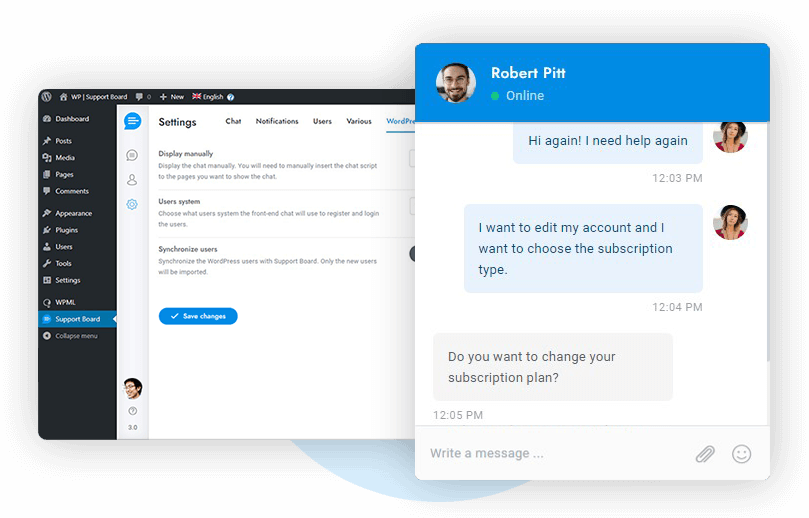
Credit: www.zendesk.com
Free Vs Paid Options
Choosing between free and paid live chat software for WordPress affects your website’s customer support. Both options offer chat features but differ in scope and capabilities. Understanding these differences helps you pick the right tool for your needs.
Key Differences
Free live chat software usually includes basic chat functions. It allows you to chat with visitors and answer simple questions. Paid options provide advanced features like chatbots, analytics, and integrations. They often support multiple agents and have faster response times. Free plans may limit the number of chats or users. Paid plans remove these limits and offer better customization.
When To Choose Free
Free live chat suits small websites or blogs with low visitor traffic. It works well for basic customer support or quick visitor engagement. When your budget is tight, free tools give a good start. Also, free plans help test chat features before upgrading. If your needs are simple and growth is slow, free chat software is enough.
Benefits Of Premium Plans
Paid live chat software offers improved customer experience and efficiency. It includes features like automated greetings and visitor tracking. Premium plans provide detailed reports to understand visitor behavior. They integrate with CRM and email marketing tools. Support teams can manage multiple chats smoothly. Paid plans often include priority support and better security. These benefits help businesses grow and keep customers happy.
Boosting Sales With Chat
Live chat software for WordPress can directly impact your sales numbers. It creates a space where visitors feel heard and supported immediately. This instant connection encourages trust and keeps potential buyers engaged. Using chat tools smartly helps turn casual visitors into paying customers. Let’s explore how live chat boosts sales through visitor engagement, lead generation, and conversation conversion.
Engaging Visitors
Live chat grabs visitor attention right away. A friendly greeting or quick help offer makes visitors stay longer. It solves questions that might block a purchase. Visitors get real-time answers, which reduces doubts. Engaged visitors explore more pages and products. This active interaction improves their shopping experience and builds confidence.
Lead Generation Tactics
Chat software collects visitor information naturally. Asking for an email to send a discount or guide works well. Visitors often share details during helpful conversations. Automated chatbots can qualify leads by asking key questions. These leads can then receive tailored marketing messages. This targeted approach increases chances of future sales.
Converting Conversations
Live chat offers personalized support during buying decisions. Chat agents can suggest products based on visitor needs. They help remove obstacles like shipping doubts or payment issues. Timely chat messages push hesitant visitors to checkout. Conversations build trust and reduce cart abandonment. This personal touch turns interest into actual sales.
Integration With Woocommerce
Integrating live chat software with WooCommerce enhances your online store’s customer interaction. It allows real-time communication directly on product pages and checkout. This connection helps answer buyer questions quickly and boosts their confidence to purchase. Effective integration also supports tracking customer behavior related to sales and support.
Recommended Plugins
Tidio offers seamless WooCommerce integration with chat and automation features. LiveChat provides a user-friendly interface and direct WooCommerce syncing. Olark connects easily and tracks customer activity alongside chat. Each plugin fits different needs, from simple live chat to advanced sales tools.
Enhancing Customer Support
Live chat lets support teams respond instantly to WooCommerce customers. Quick replies reduce cart abandonment and improve satisfaction. Chat software can show customer order history during conversations. This helps agents provide personalized help and resolve issues faster.
Tracking Sales Impact
Integration allows tracking chat influence on WooCommerce sales. You can see which chats led to purchases or upsells. Data helps optimize support strategies and marketing efforts. Understanding chat’s role in sales improves store performance over time.
Customization And User Experience
Customization and user experience play a big role in choosing the best live chat software for WordPress. A chat tool should match your website’s style and meet visitor needs. It must be easy to use, fast, and look good on all devices. These factors help keep visitors engaged and improve communication.
Good customization lets you create a chat widget that fits your brand. Personalizing messages makes visitors feel valued. Mobile compatibility ensures smooth chatting on phones and tablets. These features work together to build trust and boost customer satisfaction.
Chat Widget Design
The chat widget design should blend well with your website’s colors and fonts. You can change the shape, size, and position of the chat box. Some plugins allow adding your logo or custom icons. A clean and simple design draws attention without being distracting. It helps visitors start conversations easily.
Personalizing Messages
Personalizing messages gives a friendly and welcoming feel. You can set custom greetings based on the visitor’s location or time of day. Automated replies can answer common questions quickly. Using the visitor’s name in messages creates a personal touch. These small details improve the chat experience and encourage more interaction.
Mobile Compatibility
Many visitors use mobile devices to browse websites. The live chat software must work smoothly on smartphones and tablets. The chat widget should resize automatically to fit smaller screens. Buttons and text need to be easy to tap and read. Fast loading times and responsive design make chatting simple and pleasant on any device.

Credit: wpforms.com
Team Collaboration Features
Team collaboration features improve how support agents work together in live chat software. These tools help teams manage customer conversations smoothly. They reduce confusion and speed up response times. Collaboration makes customer support more efficient and organized.
Assigning Conversations
Assigning conversations lets team members take ownership of chats. It ensures each customer talks to the right agent. This feature avoids overlap and missed messages. Agents can focus on conversations they handle best. Managers can distribute workload fairly across the team.
Internal Notes
Internal notes allow agents to share information privately. Team members see important details without the customer knowing. Notes help explain customer history or special requests. This keeps everyone informed and ready to help. It improves teamwork and customer satisfaction.
Performance Analytics
Performance analytics track how well the team handles chats. It shows response times, chat volume, and customer ratings. Managers use data to find strengths and areas to improve. Analytics support better training and resource planning. They help create a stronger support team overall.
Installation And Setup Tips
Setting up live chat software on your WordPress site can boost customer support and engagement. A smooth installation and proper setup ensure your chat works well. Follow simple steps to get your live chat running fast and error-free.
Easy Plugin Installation
Start by logging into your WordPress dashboard. Go to the Plugins section and click “Add New.” Search for your chosen live chat plugin by name. Click “Install Now” and then “Activate” once the installation finishes. Most plugins install in seconds without extra effort.
Check plugin requirements before installation. Make sure your WordPress version supports it. Also, verify any needed PHP versions or server settings. This avoids installation errors or conflicts with other plugins.
Configuring Chat Settings
After activation, open the plugin settings from the dashboard menu. Customize the chat box appearance to match your site’s style. Set greetings, offline messages, and availability hours. Adjust notification sounds and agent details for better user experience.
Enable visitor tracking if the plugin offers it. This helps monitor chat activity and visitor behavior. Connect your chat to email or CRM for follow-ups. Save all changes before exiting the settings panel.
Troubleshooting Common Issues
If the chat does not appear on your site, clear your browser cache and refresh. Disable other plugins temporarily to check for conflicts. Update your WordPress and plugins to the latest versions for compatibility.
Review plugin documentation for error codes or setup tips. Contact support if issues persist after basic fixes. Many plugins provide FAQs and community forums for help.
Security And Privacy
Security and privacy are crucial when choosing live chat software for WordPress. Protecting user data builds trust and keeps your website safe. Visitors share personal information during chats, so safeguarding this data is a must. Reliable live chat solutions use strong security measures to prevent breaches and misuse. They also follow legal rules to protect user privacy.
Data Protection Measures
Top live chat software uses encryption to secure messages. This stops hackers from reading chat content. Data is stored safely on secure servers with limited access. Regular security updates fix vulnerabilities and improve protection. Backup systems ensure chat data is not lost. These steps help keep user information private and safe.
Compliance With Regulations
Live chat tools often comply with global privacy laws like GDPR and CCPA. These laws require clear data handling and protect user rights. Compliance means the software manages data responsibly and transparently. It also supports data access and deletion requests from users. Choosing compliant software reduces legal risks and enhances credibility.
User Consent Practices
Good live chat software asks visitors for permission before collecting data. Consent notices explain what information is gathered and why. Visitors can accept or decline data collection easily. Some tools allow users to opt out of tracking cookies. Clear consent practices respect user choices and privacy.
Credit: wordpress.org
Frequently Asked Questions
What Is The Best Live Chat Software For WordPress?
The best live chat software for WordPress offers easy integration, real-time support, and customization. Popular options include LiveChat, Tawk. to, and Tidio. These tools boost customer engagement, increase sales, and improve user experience on WordPress websites.
Are There Free Live Chat Plugins For WordPress?
Yes, several free live chat plugins are available for WordPress. Tawk. to, HubSpot Chat, and Tidio offer free versions with essential features. They provide reliable chat support without extra costs, ideal for small businesses and startups.
How Does Live Chat Improve WordPress Website Sales?
Live chat increases sales by enabling instant communication with visitors. It helps answer questions, resolve issues quickly, and build trust. This real-time interaction reduces bounce rates and encourages customers to complete purchases.
Can Live Chat Plugins Integrate With Woocommerce?
Most live chat plugins seamlessly integrate with WooCommerce. Plugins like JivoChat, Tawk. to, and Tidio support WooCommerce, allowing store owners to assist shoppers directly. This integration enhances customer support and boosts online store conversions.
Conclusion
Choosing the right live chat software boosts your WordPress site’s user experience. It helps answer questions quickly and builds trust with visitors. Many options offer easy setup and useful features. Consider your site’s needs and budget before deciding. A good chat tool keeps communication smooth and customers happy.
Try a few to see what fits best. This small step can make a big difference in engagement and sales.
Related Guides
- Woocommerce Maintenance Guide: Essential Tips for Seamless Performance
- Best Email Marketing for Real Estate Agents: Ultimate Success Tips
- Shopify Vs Bigcommerce: Ultimate Comparison for Ecommerce Success
- Shopify App Store Hidden Gems: Boost Your Store’s Success Today